Partner tiers
Tiers are your own ladder of partners, from people you barely know up to your inner circle. They show on partner cards, they filter your lists and reports, and they let you tell your assistant to work your most important relationships first.
Where to find it
Where to find it: Sidebar → Partners → the Board view. There is no separate tiers settings page any more. You build the ladder in the same place you use it.
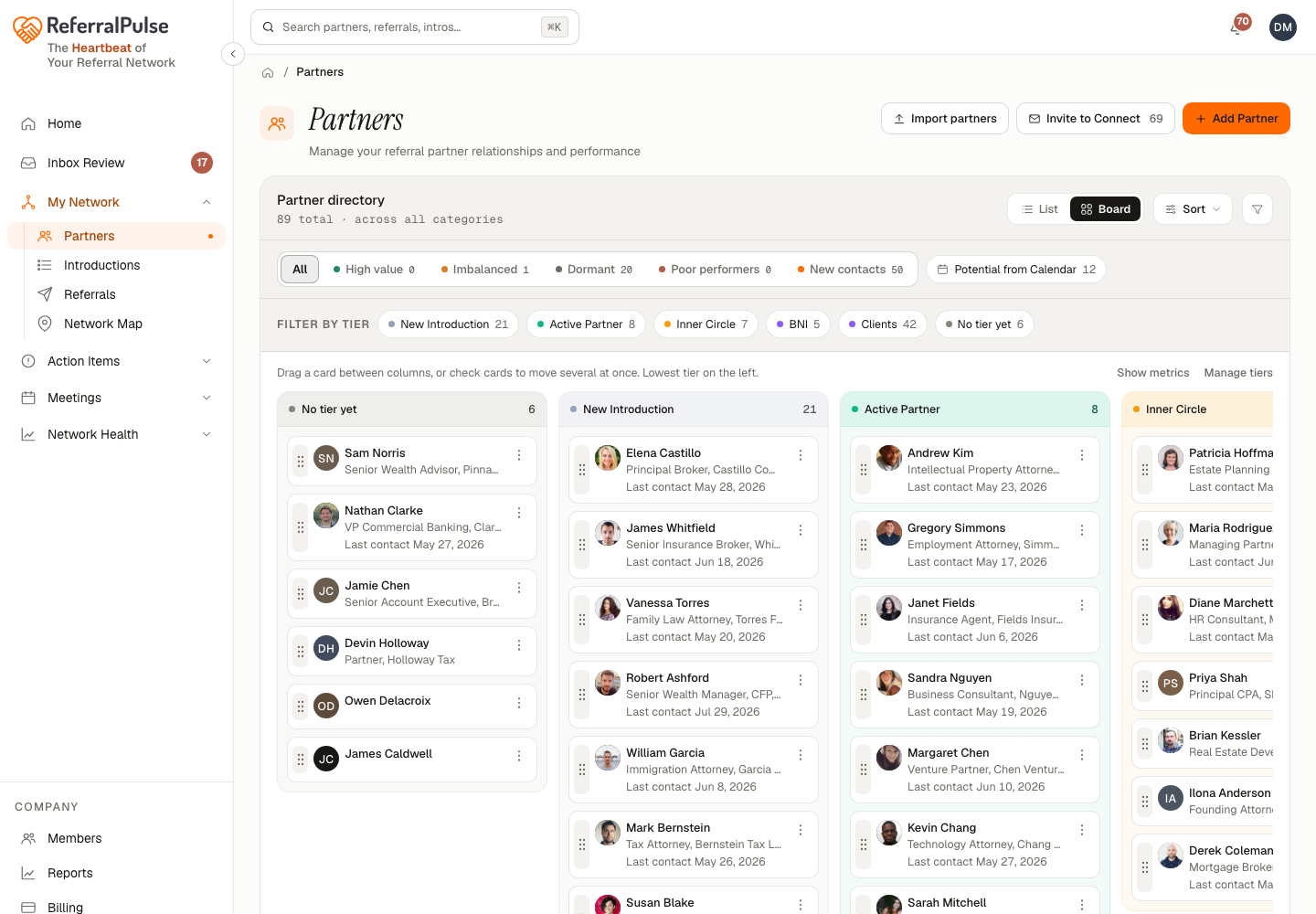
Board view gives you a column per tier, left to right from your lowest tier to your highest. Everything saves as you change it, so there is no save button to remember.
Set up your tiers
Each column header owns its own tier:
- Rename. Click the tier name in the header and type over it. Enter saves, Escape puts the old name back.
- Recolor. Click the color dot next to the name and pick from the palette. The new color follows the tier onto partner cards, chips and reports.
- Reorder. Drag the header by its grip, or use Move left and Move right in the header's actions menu.
- Add. Use Add a tier to the right in the actions menu, or the plus at the far right of the board. Twelve tiers is the maximum.
- Delete. Delete tier in the actions menu asks where the partners in that column should go before it removes anything. You cannot delete your last tier.
New partners who arrive through a forwarded introduction or a ProVisors meeting start in your lowest tier, so nothing lands in your inner circle without you putting it there.
Three or four tiers is usually enough. Ladders with seven rungs end up with everybody parked in the middle, which tells you nothing when you filter by them later.
Move partners between tiers
Drag a partner from one column to another and their tier changes. Select several cards first and the whole selection moves in one go, with an Undo on the toast. It is the fastest way to sort a lot of people at once, especially just after an import.
On a phone the board shows one tier at a time with a switcher across the top. Tap to select the people you want, then use Move to and pick the destination tier.
You can also set a tier on one partner at a time from their own page or from the edit drawer on the Partners list.
Where tiers show up
Once your partners are in tiers, the tiers do real work:
- Filtering. The chip strip on the Partners page has a chip per tier, so you can pull up your inner circle in one click.
- Reports. Referral and partner reports can be sliced by tier, which is how you find out whether your top tier is actually earning its place.
- Your assistant. Ask for pending actions, referrals or analytics for a given tier and it will answer for just those people.
- Pulse. Tier changes show up as a figure on Pulse, so a month where you promoted three partners and demoted one is visible at a glance.
Ask your assistant "show me pending actions for my Inner Circle partners" and you have a five-minute version of your week. The tier is what makes that question answerable.
By voice or in chat
Where to find it: The search box at the top of any page, or press ⌘K.
Move Patricia to my inner circle.
Which of my top-tier partners have gone quiet?
How much revenue came from my inner circle last year?
Create a tier called Referral Sources.
Your assistant can create, rename, recolor and reorder tiers for you. It does not delete them. To delete a tier, use Delete tier in the column's actions menu on the board.